Saturday, June 17, 2017

Load balancing using Nginx in Windows

Nginx is pronounced as "Engine x".
Nginx is a open-source HTTP server, reverse proxy and a load balancer.
Download Location: Nginx 1.10.2.zip

Extract the nginx zip file.
Before starting nginx there are sequence of steps to be done.

1. We will consider to work on this with two tomcat's set up. I have launched two tomcat's running on different ports 8081 and 8082. (Make sure to change listen port as well)
2. Let's have a sample war file that is deployed in both tomcats and start them.
Location to download sample war file and nginx configuration: https://github.com/raviteja548/blog-files/tree/master/nginx
3. Nginx config(nginx.conf) file has directives and those which are placed in configuration file are to be in main context.
4. let's create an upstream in http directive as below.

upstream tomcat_servers{ 
least_conn; server 127.0.0.1:8084; 
server 127.0.0.1:8085; 
}

You can name upstream as you wish. least_conn is the name of algorithm on which load balancing has to happen. Add servers on which your application is running on.
5. create a server directive as below
server { 
listen 80; 
server_name localhost;
location / { 
proxy_pass http://tomcat_servers; 
proxy_next_upstream     error timeout invalid_header http_500;
proxy_connect_timeout   2;
}
}

By default listen port is 80.
6. At the end nginx config should look like this.
#user  nobody;
worker_processes  1;

#error_log  logs/error.log;
#error_log  logs/error.log  notice;
#error_log  logs/error.log  info;

#pid        logs/nginx.pid;


events {
    worker_connections  1024;
}


http { 
upstream tomcat_servers{ 
least_conn; server 127.0.0.1:8084; 
server 127.0.0.1:8085; 
} 


    # another virtual host using mix of IP-, name-, and port-based configuration
    #
    #server {
    #    listen       8000;
    #    listen       somename:8080;
    #    server_name  somename  alias  another.alias;

    #    location / {
    #        root   html;
    #        index  index.html index.htm;
    #    }
    #}


    server { 
listen 80; 
server_name localhost;
location / { 
proxy_pass http://tomcat_servers; 
proxy_next_upstream     error timeout invalid_header http_500;
proxy_connect_timeout   2;
}
}

}

7. Navigate to nginx home directory and start it using command "start nginx"

8. Based on nginx configuration we access webapplication using url http://localhost/hello-world/ but nginx internally takes care of routing request to both tomcats i.e sending alternate request to each tomcat since the algorithm used is least connect.
9. Routing to each tomcat can be verfied adding logs.
Below screenshot to show load balancing between configured servers for different requests.

Wednesday, March 29, 2017

Sunday, October 23, 2016

Trigger Jenkins Build Using SVN PostCommit hook


This post explains about triggering jenkins build as soon as you commit files/changes to svn repository.

There are two ways to achieve this.

1. Poll repository to find if any changes done in your project location. But with this approach there is a chance of build skips since polling is done in a particular interval. This is ideally not preferable as it increases load on server, building jobs even when there are no changes detected.

2. Configure SVN repository to trigger post-commit hook which can trigger jenkins build.

This post covers 2nd way in detail.

Location of hooks folder: SVN hooks can be found right in the place where repository is created which contains directory name hooks. You can find all the type of hooks which are supported by svn.

By default all the extensions of hooks are .tmpl, in order to make them executable the extension should be changed to .bat/.exe in a windows environment.

3. Post Commit hook by default receives two arguments. They are received in an order REPOS and REV

REPOS: is the location when svn repository is created. EX: "file:///E:/WORK/svn" (on windows)

REV : is the revision value generated for every commit. EX: 18928

4. It is necessary to get an idea about utility svnlook which is a command-line utility for examining different aspects of a Subversion repository. It does not make any changes to the repository—it's just used for “peeking.” svnlook is typically used by the repository hooks explore much about "svnlook --help"

3. Triggering jenkins build on post commit will involve a series of steps i.e

a) Initially a property has to be set on the project location as a keyvalue pair. Make sure you commit property name and value changes to svn ex: name:ci:buildurl value:jenkins-job-build-url


b) Finding out which directories were updated on commit.

"svnlook" with option "dirs-changed" has the ability to find out directory changes on postcommit using revision number EX: >svnlook dirs-changed E:\WORK\svn -r 392 ( 392 is revision number, command execution would result below)
>testproj/trunk/src/main/java/testproj/

c) Extraction svn-properties on the directory that resulted in change.

"svnlook" with option "propget" and valid arguments can result in property name that was set to project.

EX:> "svnlook propget E:\WORK\svn ci:buildurl testproj/trunk/src/main/java/testproj/"

> http://localhost:8080/job/testproject/build?delay=0sec

("testproj/trunk/src/main/java/testproj/" is the folder that was updated during a commit in step b and ci:buildurl is the property name, E:\WORK\svn is the repository location)

4. Using the value obtained from step C execute curl command to run jenkins build

EX: curl -X POST http://localhost:8080/job/testproject/build?delay=0sec

5. After all the subsequent steps you can find jenkins building the job.

6. This is a sample post-commit hook attached below.

   
setlocal  
set REPOS=%1  
set REV=%2

FOR /F %%i in ('svnlook dirs-changed E:\WORK\svn -r %REV%') do SET dirloc=%%i 
 
FOR /F %%i in ('svnlook propget E:\WORK\svn ci:buildurl %dirloc%') do SET PROP=%%i

if defined %PROP%
curl -X POST %PROP%

Tuesday, June 14, 2016

Quick start to heroku applications


Nexus Repository Manager

Nexus is a repository manager & stating repository in which files can be uploaded using maven. Alternatively files can be also uploaded via curl commands.
This tutorial outlines to install Nexus also covers artifacts upload using maven & files upload using curl commands.
1. Download latest nexus war file from http://www.sonatype.org/downloads/nexus- latest.war
2. Deploy the war file in any webserver.
3. Launch nexus home page http://localhost:8081/nexus-2.13.0-01/#welcome
4. Default username and password to login are admin & admin123
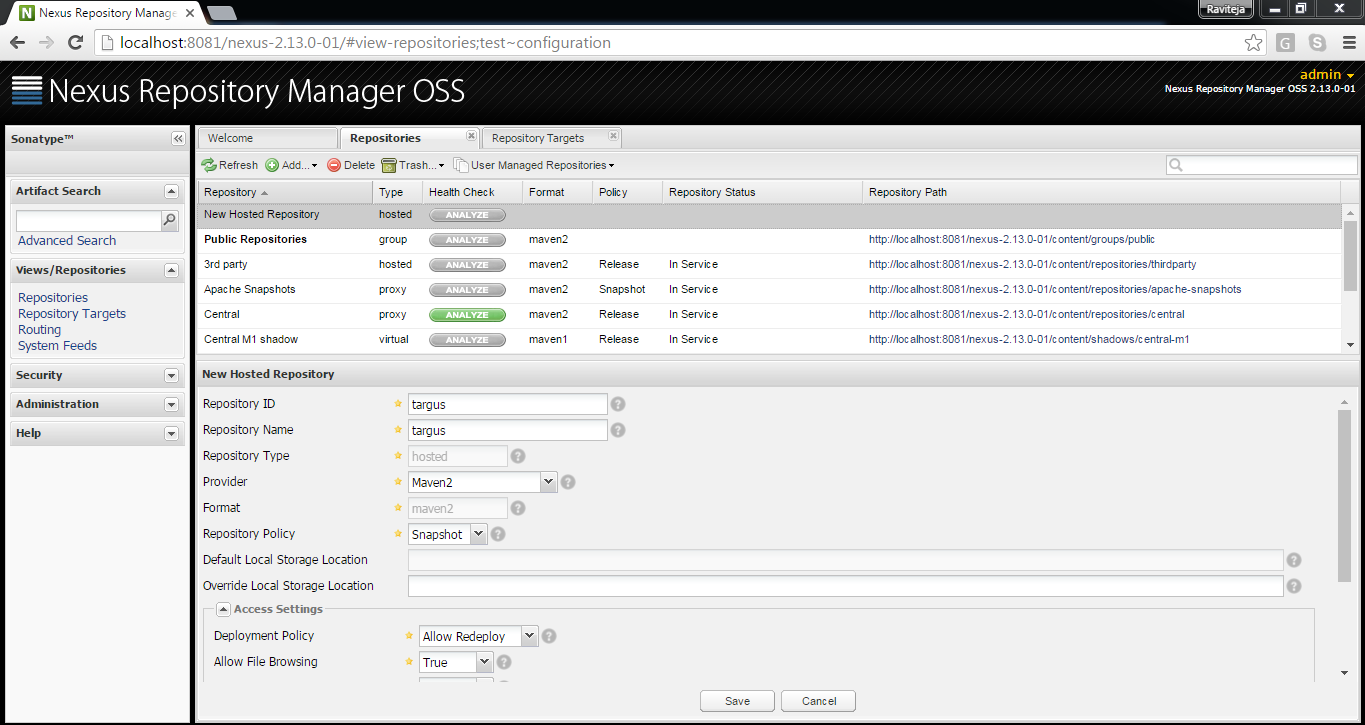
5. You can create your own Repository from views/Repositories section
6. Add a hosted repository using the sample configuration shown in image.

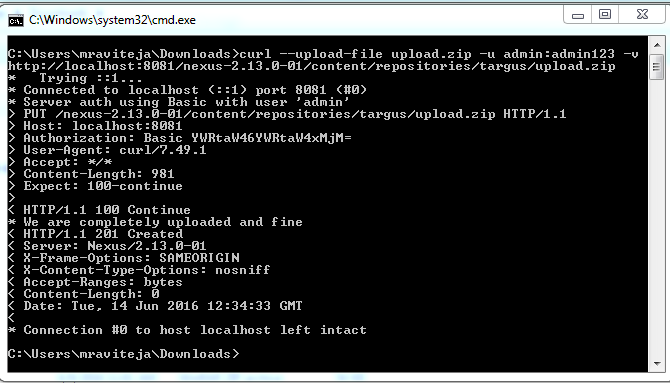
7. Have curl in classpath to upload files into repository. Example: curl --upload-file upload.zip -u admin:admin123 -v http://localhost:8081/nexus-2.13.0-01/content/repositories/targus/upload.zip Repository url can be found navigating to corresponding repository and in summary section

8. Files uploaded can be found in the browse storage section of the respective repository.

Sunday, October 11, 2015

FindBugs Jenkins Integration

Jenkins installation & integration with firebugs documentation available in the link. Download here Maven plugin for findbugs report generation.
<reporting>
    <plugins>
        <plugin>
            <groupId>org.codehaus.mojo</groupId>
            <artifactId>findbugs-maven-plugin</artifactId>
            <version>2.5.2</version>
            <configuration>
                <!--
                    Enables analysis which takes more memory but finds more bugs.
                    If you run out of memory, changes the value of the effort element
                    to 'low'.
                -->
                <effort>Max</effort>
                <!-- Reports all bugs (other values are medium and max) -->
                <threshold>Low</threshold>
                <!-- Produces XML report -->
                <xmlOutput>true</xmlOutput>
            </configuration>
        </plugin>
    </plugins>
</reporting>
Command to generate find bugs report : mvn clean compile site

Wednesday, July 15, 2015

PEM File Creation

PEM:Privacy Enhanced Mail is a Base64 encoded DER certificate
PEM files are used to represent Certificate/PrivateKey in an understandable format. They have a distinct header and footer for every key, where the body is composed of Base64 encoded Key.
They are represented as shown below for (Certificate/PrivateKey/Certificate Signing Request/PublicKey)
-----BEGIN RSA PRIVATE KEY-----
MIICWwIBAAKBgQCpF26VoB9/Au3Ct/dBFW5kfXFU8IkK+G3CG4slkVX2mwBtvLyb
mFAuQ3RXvmX6tZxeUgwN7m+pZH+Y94lgAIpvcnzBEh8FFxwu0jy17uw+4ler5Soy
YRGV8TYOeQHqoHS44clTG28T2RYy9lkRqTIkkCyo5ViyD7GVQVUgjR31LQIDAQAB
AoGAFmkioPYd9ol+1aXoQVoDzZHKqYVPxIJ0mZto78u5ZvvYLLMtFDo1tkv+aXq0
rWvQk7ewHVCSwBKvzqhQLscjkbZqBdhnkBsyDQTcTQ+0sf8RGDHhBz2A1gGrBFhB
rWc9wGuk7CFHUCrUL0ZXBquMM1KCd/+Fdg2+OQzcoJd9/AECQQDkLdyiaG4Y/lFM
i4wtIf9rNVP4a1jHcYk1Ll7wvymY+v0e9zNVqKbkHaZ4/tyvD3MzVXZCByJZoFu4
sCWRK9WBAkEAvbVF3E7jxrQNTNRqLyQW6v0cmNSCSUfDkYANRuO+d6xvvT2HgrYs
SiL8h4qDLkbM/LTvf9lxb8vSlUSt/3ctrQJAP70767YmQx8PkMVOg/ECS21bJoK+
CwCBJnTsmm2b7hr2iCbflScGb6SEsznmZZR4Rrex0CH0C3tLA91YsSPAgQJAa1Wc
6UFZbpuAyu+EBJgOv3XmMDJMZNnNtQ0Wdf11TpCpyBCAE1yvQmL5LlcYUZ6NbI2S
1Gta2z4fL4VkTR5JIQJAQE6QBPguRRYLFyDa6db+QyeJ1iBHy3I8XvK9bem+Dsby
Km2l2KzLk3IpIEniqjLcoCQzFd5jp8m5VfjMx1doQQ==
-----END RSA PRIVATE KEY-----

-----BEGIN PUBLIC KEY-----
MIGfMA0GCSqGSIb3DQEBAQUAA4GNADCBiQKBgQCpF26VoB9/Au3Ct/dBFW5kfXFU
8IkK+G3CG4slkVX2mwBtvLybmFAuQ3RXvmX6tZxeUgwN7m+pZH+Y94lgAIpvcnzB
Eh8FFxwu0jy17uw+4ler5SoyYRGV8TYOeQHqoHS44clTG28T2RYy9lkRqTIkkCyo
5ViyD7GVQVUgjR31LQIDAQAB
-----END PUBLIC KEY-----


-----BEGIN CERTIFICATE-----
MIIBmjCCAQMCBgFOkeZMojANBgkqhkiG9w0BAQsFADATMREwDwYDVQQDEwhSYXZp
VGVqYTAeFw0xNTA3MTQxMzI3NDVaFw0xNTA2MjkyMTQ1NTZaMBMxETAPBgNVBAMT
CFJhdmlUZWphMIGfMA0GCSqGSIb3DQEBAQUAA4GNADCBiQKBgQCpF26VoB9/Au3C
t/dBFW5kfXFU8IkK+G3CG4slkVX2mwBtvLybmFAuQ3RXvmX6tZxeUgwN7m+pZH+Y
94lgAIpvcnzBEh8FFxwu0jy17uw+4ler5SoyYRGV8TYOeQHqoHS44clTG28T2RYy
9lkRqTIkkCyo5ViyD7GVQVUgjR31LQIDAQABMA0GCSqGSIb3DQEBCwUAA4GBAIh6
cNhWToRwhaJBykHXPqiaqPDA8n0xtq65dBiUQWOKeoXw0I7+LKUUzfHfb4wGZoLK
W2rBnNCY1BtpasqtAkdZ/Q+keJQd9xBcPqnKGUEqxxX7omB7cKYuhw9C+rGn/K1J
Ci1xlYBWuRsMd3A064fSHV0Adu+ru9YaWyS5+aLU
-----END CERTIFICATE-----


Java Program to generate PEM files.
package bc;

import java.io.File;
import java.io.FileWriter;
import java.io.PrintWriter;
import java.math.BigInteger;
import java.security.KeyPair;
import java.security.KeyPairGenerator;
import java.security.SecureRandom;
import java.security.Security;
import java.security.cert.X509Certificate;
import java.util.Date;

import javax.security.auth.x500.X500Principal;

import org.bouncycastle.jce.provider.BouncyCastleProvider;
import org.bouncycastle.openssl.PEMWriter;
import org.bouncycastle.x509.X509V1CertificateGenerator;

public class PEMWrite {
    public static void main(String[] args) throws Exception {
        generateSelfSignedX509Certificate();
    }

    static {
        // adds the Bouncy castle provider to java security
        Security.addProvider(new BouncyCastleProvider());
    }

    /**
     * Generate a self signed X509 certificate with Bouncy Castle.
     */
    static void generateSelfSignedX509Certificate() throws Exception {

        // yesterday
        Date validityBeginDate = new Date(System.currentTimeMillis() - 24 * 60 * 60 * 1000);
        // in 2 years
        Date validityEndDate = new Date(System.currentTimeMillis() + 2 * 365 * 24 * 60 * 60 * 1000);

        // GENERATE THE PUBLIC/PRIVATE RSA KEY PAIR
        KeyPairGenerator keyPairGenerator = KeyPairGenerator.getInstance("RSA", "BC");
        keyPairGenerator.initialize(1024, new SecureRandom());

        KeyPair keyPair = keyPairGenerator.generateKeyPair();

        // GENERATE THE X509 CERTIFICATE
        X509V1CertificateGenerator certGen = new X509V1CertificateGenerator();
        X500Principal dnName = new X500Principal("CN=RaviTeja");
        certGen.setSerialNumber(BigInteger.valueOf(System.currentTimeMillis()));
        certGen.setSubjectDN(dnName);
        certGen.setIssuerDN(dnName); // use the same
        certGen.setNotBefore(validityBeginDate);
        certGen.setNotAfter(validityEndDate);
        certGen.setPublicKey(keyPair.getPublic());
        certGen.setSignatureAlgorithm("SHA256WithRSAEncryption");
        X509Certificate cert = certGen.generate(keyPair.getPrivate(), "BC");
        System.out.println(cert);

        // PEM format representing Certificate
        PEMWriter pemWriter = new PEMWriter(new PrintWriter(System.out));
        pemWriter.writeObject(cert);
        pemWriter.flush();

        //Loads Private Key as PEM format into private_key.pem file
        File file = new File("private_key.pem");
        PEMWriter pw1 = new PEMWriter(new FileWriter(file));
        pw1.writeObject(keyPair.getPrivate());
        pw1.flush();
        pw1.close();

        //PEM format representing PrivateKey
        pemWriter.writeObject(keyPair.getPrivate());
        pemWriter.flush();

        //PEM format representing PublicKey
        pemWriter.writeObject(keyPair.getPublic());
        pemWriter.flush();
        pemWriter.close();

    }
}


Tuesday, April 28, 2015

JSON & XML Online Conversion tool

http://jsonxmlutil.appspot.com/
This tutorial is for converting JSON to XML or XML to JSON. The conversion happens using APIGEE tool, which is used to develop APIs. For the conversion of JSON/XML we use the target endpoint's that are developed on APIGEE tool. We create an API for the conversion which will have two resources inorder to handle JSONtoXML and XMLtoJSON requests.

Step1:Create a resource jsontoxml or any name..


Step2: In develope section , you can arrange all the policies to be applied on the requests. The request gets route on the basis of matching pattern Ex: ../convert/jsontoxml,.../convert/xmltojson (For this you should have good understanding on APIGEE )


Step3: Deploy to environment available


Step4: Go to trace section and Start the Trace Session and hit the url's, you find the live traffic logging.


Finally


How does the conversion happen

APIGEE tool has the ability to do service chaining, sampling data, make XML/JSON conversions, extract variables from request or response e.t.c
APIGEE record the request sent by user into request variable, we now form a list of policies in a sequence to be executed.
Ex: for xml to json conversion, in the response flow


1) Create an assign message policy and assign all the xml request that is sent into an variable response.
2)Send this response xml to an XML to JSON policy using the request as source & assign it to an output variable.
3)Finally assign the json response in an Assign-Message-Policy which can be consumed by any one who ever sends the request.


Source code has been bundled, any one needs this proxy can download it from the url and import in their APIGEE account. Download Here

Saturday, February 14, 2015

Plan My Tavel

Checkout a new application to plan your train journey's using

Plan Your Journeys

Developed using : Angular JS, Groovy & Grails, JQuery UI, JavaScript, Responsive Layout.
Trains Between Stations and Seat Availability Source code location : Source Code

Services Used From : railpnrapi.com End Points: Trains Between Stations Sample Response:

{
    "from_station": {
        "name": "Kakinada Town",
        "code": "CCT"
    },
    "to_station": {
        "name": "Secunderabad Junction",
        "code": "SC"
    },
    "trains": [{
        "number": "17206",
        "name": "Cct Snsi Express",
        "src_arrival_time": "Start",
        "src_departure_time": "06:15",
        "dest_arrival_time": "16:25",
        "dest_departure_time": "16:40",
        "days": [{
            "day-code": "SUN",
            "runs": "N"
        }, {
            "day-code": "MON",
            "runs": "Y"
        }, {
            "day-code": "TUE",
            "runs": "N"
        }, {
            "day-code": "WED",
            "runs": "Y"
        }, {
            "day-code": "THU",
            "runs": "N"
        }, {
            "day-code": "FRI",
            "runs": "N"
        }, {
            "day-code": "SAT",
            "runs": "Y"
        }],
        "classes": [{
            "class-code": "1A",
            "available": "N"
        }, {
            "class-code": "2A",
            "available": "Y"
        }, {
            "class-code": "FC",
            "available": "N"
        }, {
            "class-code": "3A",
            "available": "Y"
        }, {
            "class-code": "CC",
            "available": "N"
        }, {
            "class-code": "SL",
            "available": "Y"
        }, {
            "class-code": "2S",
            "available": "N"
        }, {
            "class-code": "3E",
            "available": "N"
        }]
    }, {
        "number": "17221",
        "name": "Coa Ltt Express",
        "src_arrival_time": "08:53",
        "src_departure_time": "08:55",
        "dest_arrival_time": "20:20",
        "dest_departure_time": "20:25",
        "days": [{
            "day-code": "SUN",
            "runs": "N"
        }, {
            "day-code": "MON",
            "runs": "N"
        }, {
            "day-code": "TUE",
            "runs": "N"
        }, {
            "day-code": "WED",
            "runs": "Y"
        }, {
            "day-code": "THU",
            "runs": "N"
        }, {
            "day-code": "FRI",
            "runs": "N"
        }, {
            "day-code": "SAT",
            "runs": "Y"
        }],
        "classes": [{
            "class-code": "1A",
            "available": "N"
        }, {
            "class-code": "2A",
            "available": "Y"
        }, {
            "class-code": "FC",
            "available": "N"
        }, {
            "class-code": "3A",
            "available": "Y"
        }, {
            "class-code": "CC",
            "available": "N"
        }, {
            "class-code": "SL",
            "available": "Y"
        }, {
            "class-code": "2S",
            "available": "N"
        }, {
            "class-code": "3E",
            "available": "N"
        }]
    }, {
        "number": "12737",
        "name": "Goutami Express",
        "src_arrival_time": "20:28",
        "src_departure_time": "20:33",
        "dest_arrival_time": "06:35",
        "dest_departure_time": "Ends",
        "days": [{
            "day-code": "SUN",
            "runs": "Y"
        }, {
            "day-code": "MON",
            "runs": "Y"
        }, {
            "day-code": "TUE",
            "runs": "Y"
        }, {
            "day-code": "WED",
            "runs": "Y"
        }, {
            "day-code": "THU",
            "runs": "Y"
        }, {
            "day-code": "FRI",
            "runs": "Y"
        }, {
            "day-code": "SAT",
            "runs": "Y"
        }],
        "classes": [{
            "class-code": "1A",
            "available": "Y"
        }, {
            "class-code": "2A",
            "available": "Y"
        }, {
            "class-code": "FC",
            "available": "N"
        }, {
            "class-code": "3A",
            "available": "Y"
        }, {
            "class-code": "CC",
            "available": "N"
        }, {
            "class-code": "SL",
            "available": "Y"
        }, {
            "class-code": "2S",
            "available": "N"
        }, {
            "class-code": "3E",
            "available": "N"
        }]
    }],
    "error": null
}
Seat Availability Sample Response:
{
    "response_code": 200,
    "availability": {
        "train_number": "12738",
        "train_name": "GOUTAMI EXP    ",
        "date_of_journey": "21-02-2015",
        "from": {
            "name": "SECUNDERABAD JN",
            "code": "sc",
            "location": null
        },
        "to": {
            "name": "KAKINADA TOWN  ",
            "code": "cct",
            "location": null
        },
        "class": {
            "class_code": "SL",
            "class_name": "SLEEPER CLASS"
        },
        "quota": {
            "quota_code": "CK",
            "quota_name": "TATKAL"
        },
        "availability_status": [{
            "date": "21-02-2015",
            "status": "AVAILABLE 151"
        }, {
            "date": "22-02-2015",
            "status": "AVAILABLE 151"
        }, {
            "date": "23-02-2015",
            "status": "AVAILABLE 151"
        }, {
            "date": "24-02-2015",
            "status": "AVAILABLE 151"
        }, {
            "date": "25-02-2015",
            "status": "AVAILABLE 151"
        }, {
            "date": "26-02-2015",
            "status": "AVAILABLE 151"
        }]
    }
}
PNR STATUS
EndPoint: PNR STATUS Sample Response:
{
    "response_code": 200,
    "pnr": "4824325952",
    "train_num": "12738",
    "train_name": "GOUTAMI EXP    ",
    "doj": "2015-03-06",
    "from_station": {
        "code": "SC  ",
        "name": "Secunderabad Junction"
    },
    "to_station": {
        "code": "CCT ",
        "name": "Kakinada Town"
    },
    "reservation_upto": {
        "code": "CCT ",
        "name": "Kakinada Town"
    },
    "boarding_point": {
        "code": "SC  ",
        "name": "Secunderabad Junction"
    },
    "class": " SL",
    "no_of_passengers": 6,
    "chart_prepared": "N",
    "passengers": [{
        "sr": "1",
        "booking_status": "S8,35,GN",
        "current_status": "CNF"
    }, {
        "sr": "2",
        "booking_status": "S8,34,GN",
        "current_status": "CNF"
    }, {
        "sr": "3",
        "booking_status": "S8,40,GN",
        "current_status": "CNF"
    }, {
        "sr": "4",
        "booking_status": "S8,38,GN",
        "current_status": "CNF"
    }, {
        "sr": "5",
        "booking_status": "S8,37,GN",
        "current_status": "CNF"
    }, {
        "sr": "6",
        "booking_status": "S8,24,GN",
        "current_status": "CNF"
    }],
    "error": null
}

Saturday, November 1, 2014

PNR Status Application

Hey!! I have developed an application to check your pnr status Have you booked any train ticket with which is not confirmed?. Then you can check it right now here.
Click here to access

API from railpnrapi paid service
Developed on Grails Platform
source code available in github

Wednesday, October 22, 2014

Convert JSON to JavaObject

An easiest approach to parse Json.
org.codehaus.jackson.map.ObjectMapper
#ObjectMapper
This mapper provides functionality for conversting between Java objects and matching JSON. It will use instances of JsonParser and JsonGenerator for implementing actual reading/writing of JSON.

We show the binding to convert JSon to JavaObject

1)student.json


{
   "studentName":"John",
   "age":"15",
   "class":10,
   "schoolDetails":{
      "schoolName":"St Xavier",
      "city":"Bangalore",
      "street":"Nice Road",
      "area":"Electronic city"
      
   },
   "studentResults":[
      {
         "sno":"1",
         "description":"Quarterly Exams",
         "marks":500,
         "grade":"A"
      },
      {
         "sno":"2",
         "description":"Half yearly Exams",
         "marks":478,
         "grade":"B"
      },
   {
         "sno":"3",
         "description":"Annual yearly Exams",
         "marks":507,
         "grade":"A"
      }
   ]
}

2)Create a class to map Json

From the above Json you should be able identify datatypes, custom objects, array/lists of objects.
 a) Create a class StudentData or it can be anything, add studentName,age,class as memeber variables.(here we have student's class. Since class
    is a keyword in java, it cannot be used as a variable, so declare it as clazz)
 b) schoolDetails is an Object in JSON , create a class StudentDetails with its member variables and add schoolDetails as a member in StudentData
    class.
 c) studentResults is an Array/List, create a class StudentResults with its members and add a list property that accepts StudentResults in
    StudentData class.
 d) If every thing is done your class should look like the below class.
 e) Since we defined class as clazz in order to map them correctly use JsonProperty annotation.
     @JsonProperty("class")
     private int clazz;


package json2obj;

import org.codehaus.jackson.annotate.JsonProperty;

import java.util.List;

/**
 * Created with IntelliJ IDEA.
 * User: RAVI
 * Date: 23/10/14
 * Time: 9:16 AM
 * To change this template use File | Settings | File Templates.
 */
public class StudentData {
    private String studentName;
    private String age;
    @JsonProperty("class")
    private int clazz;
    private SchoolDetails schoolDetails;
    private List<StudentResults> studentResults;

    public String getStudentName() {
        return studentName;
    }

    public void setStudentName(String studentName) {
        this.studentName = studentName;
    }

    public String getAge() {
        return age;
    }

    public void setAge(String age) {
        this.age = age;
    }

    public int getClazz() {
        return clazz;
    }

    public void setClazz(int clazz) {
        this.clazz = clazz;
    }

    public SchoolDetails getSchoolDetails() {
        return schoolDetails;
    }

    public void setSchoolDetails(SchoolDetails schoolDetails) {
        this.schoolDetails = schoolDetails;
    }

    public List<StudentResults> getStudentResults() {
        return studentResults;
    }

    public void setStudentResults(List<StudentResults> studentResults) {
        this.studentResults = studentResults;
    }


    public String toString(){
        String sData = "";
        sData+= "Student Details\n===============\nStudent Name:"+studentName+" Age:"+age+" class:"+clazz+"\n";

        sData+= "School Details\n================\nSchool Name:"+schoolDetails.getSchoolName()+" City:"+schoolDetails.getCity()+" Street:"+schoolDetails.getStreet()+" Area:"+schoolDetails.getArea()+"\n";
        sData+="Student Results\n================\n";
        for(StudentResults sr:studentResults){
         sData+= "SNO:"+sr.getSno()+" Description:"+sr.getDescription()+" Marks:"+sr.getMarks()+" Grade:"+sr.getGrade()+"\n";

        }
        return  sData;
    }
}

class SchoolDetails{
    private String schoolName;
    private String city;
    private String street;
    private String area;

    public String getSchoolName() {
        return schoolName;
    }

    public void setSchoolName(String schoolName) {
        this.schoolName = schoolName;
    }

    public String getCity() {
        return city;
    }

    public void setCity(String city) {
        this.city = city;
    }

    public String getStreet() {
        return street;
    }

    public void setStreet(String street) {
        this.street = street;
    }

    public String getArea() {
        return area;
    }

    public void setArea(String area) {
        this.area = area;
    }
}

class StudentResults{
    private String sno;
    private String description;
    private int marks;
    private String grade;

    public String getSno() {
        return sno;
    }

    public void setSno(String sno) {
        this.sno = sno;
    }

    public String getDescription() {
        return description;
    }

    public void setDescription(String description) {
        this.description = description;
    }

    public int getMarks() {
        return marks;
    }

    public void setMarks(int marks) {
        this.marks = marks;
    }

    public String getGrade() {
        return grade;
    }

    public void setGrade(String grade) {
        this.grade = grade;
    }
}

3)Convert JSON to Java Object

Add the following dependency
<dependency>
            <groupId>org.codehaus.jackson</groupId>
            <artifactId>jackson-mapper-asl</artifactId>
            <version>1.9.13</version>
</dependency>
The following class will convert Json to Object

package json2obj;

import org.codehaus.jackson.map.ObjectMapper;

import java.io.BufferedReader;
import java.io.FileReader;
import java.io.IOException;

/**
 * Created with IntelliJ IDEA.
 * User: RAVI
 * Date: 23/10/14
 * Time: 9:05 AM
 * To change this template use File | Settings | File Templates.
 */
public class ConvertJsonToObj {
    public static void main(String... args) throws IOException {
        FileReader fr = new FileReader("src/main/resources/student.json");
        BufferedReader bufferedReader = new BufferedReader(fr);

        String jsonString  = "";
         String curLine ="";
        while((curLine = bufferedReader.readLine())!=null){
              jsonString+=curLine.trim();
        }

        System.out.println(jsonString);

        ObjectMapper objectMapper = new ObjectMapper();
         StudentData sd = new StudentData();
        sd = objectMapper.readValue(jsonString,StudentData.class);

        System.out.println(sd);


    }
}

Output:

Student Details
===============
Student Name:John Age:15 class:10
School Details
================
School Name:St Xavier City:Bangalore Street:Nice Road Area:Electronic city
Student Results
================
SNO:1 Description:Quarterly Exams Marks:500 Grade:A
SNO:2 Description:Half yearly Exams Marks:478 Grade:B
SNO:3 Description:Annual yearly Exams Marks:507 Grade:A

Sunday, October 19, 2014

JAXB XML Parsing

How easy to parse an xml??? You might be having a huge xml, but still its not a matter to parse it even you don't know its structure. Now! you will see how to parse any xml using jaxb. All necessary is only a xsd. Don't worry even if you don't have it. You can create your xsd using different tools/online. If you need to create it your self you should be knowing xsd rules. Lets see an example 1)This is your xml

200
1234567890
12311
HWH DLI KLK MAI
23-12-2013

DLI
Delhi


KLK
Kalka


KLK
Kalka


DLI
Delhi

1A
3
N


1
CNF ,GN
CNF


2
CNF ,GN
CNF


3
CNF ,GN
CNF


2) Generate xsd using eclipse/tools/online/yourself... 3) Generate jaxb classes. a)Create a maven based project b)add the following lines to your pom.xml(its a plugin to convert your xsd schema to corresponding jaxb classes.)

<build>
        <plugins>
            <plugin>
                <artifactId>maven-compiler-plugin</artifactId>
                <configuration>
                    <source>1.6</source>
                    <target>1.6</target>
                </configuration>
            </plugin>
            <plugin>
                <groupId>org.jvnet.jaxb2.maven2</groupId>
                <artifactId>maven-jaxb2-plugin</artifactId>
                <version>0.8.3</version>
                <configuration>
                   <schemaDirectory>src/main/resources/schema</schemaDirectory>
                   <bindingDirectory>src/main/resources/schema</bindingDirectory>
                   <generatePackage>org.pnr</generatePackage>
                   <strict>false</strict>
                   <extension>true</extension>
                   <plugins>
                       <plugin>
                           <groupId>org.jvnet.jaxb2_commons</groupId>
                           <artifactId>jaxb2-basics</artifactId>
                           <version>0.6.2</version>
                       </plugin>
                       <plugin>
                           <groupId>org.jvnet.jaxb2_commons</groupId>
                           <artifactId>jaxb2-basics-annotate</artifactId>
                           <version>0.6.2</version>
                       </plugin>
                   </plugins>
                   <args>
                       <arg>-Xannotate</arg>
                       <arg>-XtoString</arg>
                   </args>
                </configuration>
                <executions>
                    <execution>
                        <id>generate</id>
                        <goals>
                            <goal>generate</goal>
                        </goals>
                    </execution>
                </executions>
            </plugin>
        </plugins>
    </build>
    <dependencies>
        <dependency>
            <groupId>org.jvnet.jaxb2_commons</groupId>
            <artifactId>jaxb2-basics-runtime</artifactId>
            <version>0.6.2</version>
        </dependency>
    </dependencies>

       
4) Create a directory with name schema in your resource folder in your project(it can be any place, but specify the location of xsd in your pom.xml) Place the xsd file in resources/schema folder for which jaxb classes should be generated.

5) Build the project using command mvn clean install -e 6) you can see all the generated files in target/generated-sources/xjc path present in their packages, specified in pom.xml i.e org.pnr 7)Place the generated ObjectFactory.java and Xml.java in your class path. Or directly place them in your package structure. 8)Finally it's time to see jaxb parsing.
import javax.xml.bind.JAXBContext;
import javax.xml.bind.JAXBException;
import javax.xml.bind.Unmarshaller;
import java.io.StringReader;


import pnr.Xml;
import pnr.ObjectFactory;
/**
 * Created with IntelliJ IDEA.
 * User: RAVI
 * Date: 11/10/14
 * Time: 12:10 PM
 * To change this template use File | Settings | File Templates.
 */
public class TestXmlToJaxb {

    public static void main(String args[]){
         Converter c = new Converter();
        c.doConversion();
    }
}

class Converter{
    public void doConversion(){
                
               String xmlString = "" +
                                  "200" +
                                  "1234567890" +
                                  "12311" +
                                  "HWH DLI KLK MAI" +
                                  "23-12-2013" +
                                  "" +
                                  "DLI" +
                                  "Delhi" +
                                  "" +
                                  "" +
                                  "KLK" +
                                  "Kalka" +
                                  "" +
                                  "" +
                                  "KLK" +
                                  "Kalka" +
                                  "" +
                                  "" +
                                  "DLI" +
                                  "Delhi" +
                                  "" +
                                  "1A" +
                                  "3" +
                                  "N" +
                                  "" +
                                  "" +
                                  "1" +
                                  "CNF ,GN" +
                                  "CNF" +
                                  "" +
                                  "" +
                                  "2" +
                                  "CNF ,GN" +
                                  "CNF" +
                                  "" +
                                  "" +
                                  "3" +
                                  "CNF ,GN" +
                                  "CNF" +
                                  "" +
                                  "" +
                                  "" +
                                  "";
    try{

        JAXBContext jaxbContext = JAXBContext.newInstance(Xml.class);

        Unmarshaller jaxbUnmarshaller = jaxbContext.createUnmarshaller();
        Xml xmll = (Xml) jaxbUnmarshaller.unmarshal(new StringReader(xmlString));
        System.out.println(xmll);
        System.out.println(xmll.getResponseCode());
        Xml.Passengers pass = xmll.getPassengers();
        System.out.println(pass.getPassenger().get(1));

        } catch (JAXBException e) {
            e.printStackTrace();  
        }

    }
}
Output:
pnr.Xml@311671b2[responseCode=200, pnr=1234567890, trainNum=12311, trainName=HWH DLI KLK MAI, doj=23-12-2013, fromStation=pnr.Xml$FromStation@7d2452e8[code=DLI, name=Delhi], toStation=pnr.Xml$ToStation@5bbf3d87[code=KLK, name=Kalka], reservationUpto=pnr.Xml$ReservationUpto@6860991f[code=KLK, name=Kalka],

boardingPoint=pnr.Xml$BoardingPoint@1de4f7c2[code=DLI, name=Delhi], clazz=1A, noOfPassengers=3, chartPrepared=N, 

passengers=pnr.Xml$Passengers@2345f0e3[passenger={pnr.Xml$Passengers$Passenger@44c9d92c[sr=1, bookingStatus=CNF ,GN, currentStatus=CNF],pnr.Xml$Passengers$Passenger@1fd0fafc[sr=2, bookingStatus=CNF ,GN, currentStatus=CNF],pnr.Xml$Passengers$Passenger@510dc6b5[sr=3, bookingStatus=CNF ,GN, currentStatus=CNF]}], error=]
200
pnr.Xml$Passengers$Passenger@1fd0fafc[sr=2, bookingStatus=CNF ,GN, currentStatus=CNF]

Tuesday, September 30, 2014

Android Battery Manager to display charging status

Android application to display battery charging percentage. This application display's charging percentage in notification area, and gets updated whenever battery is discharged. Source code available in github at https://github.com/raviteja548/battery-manager
Download Source

Tuesday, August 19, 2014

SVN Installation, Backup and Restore

Simple installation of svn. It says how to restore a backup and restore it. You can use the backup file to restore whenever svn is installed freshly.

Command to backup Repository:

svnadmin dump "repo location" > "backup file" (do not include quotations)
Example:
c:>svnadmin dump c:\svnrepo > svnbackup_file_name


Command to Restore repository:


svnadmin load "svn location where repo is created" < "svn backup file name"
Example:
c:>svnadmin load c:\svnrepo < svnbackup_file_name